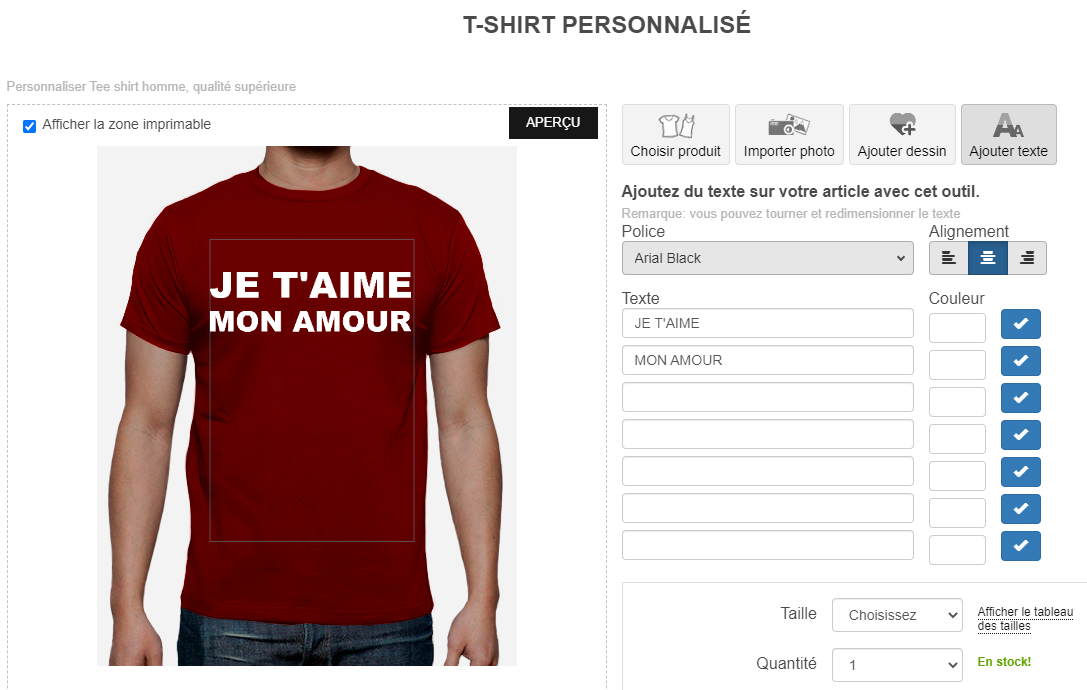
Creating your own custom t-shirts has never been easier with our customization tool.
1) On the " Choose Product " tab, select a product or style for your t-shirt.
2) In " Upload Your Photo ," you can upload a file/photo in JPEG or PNG format (for images with transparency).
Note: If the image you uploaded is too small and you can't enlarge it, the original resolution is too low. The minimum resolution is 120 dpi for print quality. For example, if the image to be printed is 20 cm wide, the design will also be 20 cm wide (it can be reduced, but not enlarged). Maximum print width: 24 cm.
3) In " Add a Design ," browse the categories or use the search field until you find a design you like. You can then resize or flip the image, for example.
4) With the " Add Text " option, simply fill in the fields where "Text" appears; choose the font, increase or decrease the size as desired, and select your preferred color.
If you want to add more complex text with features not available in our standard formats (for example, a distressed effect), multiple colors, or gradients, you can create a PNG with a transparent background using Photoshop and then upload it via the "Upload your photo" tab.
Once finished, you can add your customized products to your cart and proceed with your order, without needing to create a user account. You can also send your cart to friends to view or save it to your favorites for later use.
You don't need a user account to purchase an item on LaTostadora.
Thousands of t-shirts and apparel created by other users are available in the Marketplace . You can search for them by category or keyword!
If you want to create and sell items in your own store, log in to your user account and click " Add a design ."